
GIMP and Krita are free, open-source desktop options for different kinds of image work. Start with GIMP if your immediate task is a photo composite using layers, a mask and a crop. Start with Krita if you want to paint on a separate layer and return to that drawing later.
That is a task-based starting point, not a claim that either program replaces every Photoshop workflow. We tested one small native project in each app on Windows. We did not test migration from a Photoshop-created PSD.
Choose by the work you need to keep editable
| Your next task | Starting point | What our test actually covered |
|---|---|---|
| Combine a photo with a label and hide part of an accent | GIMP | Named layers, a layer mask, a crop, XCF save/reopen and two PNG exports |
| Add brush marks above a photo and continue later | Krita | A layer group, a separate painting layer at 65% opacity, KRA save/reopen and another brush mark on that same layer |
| Bring a complex Photoshop project across intact | Test your own project first | Native PSD migration, smart objects, editable text and complex blending were outside our tests |
Official sources and current releases
GIMP · Release 3.2.8 · Released 2026-11-02
GIMP
Official downloads ↗Krita · Release 5.3.4.1 · Released 2026-10-07
Krita
Official downloads ↗Get current packages from GIMP's official downloads or Krita's official downloads. The versions below describe the experiments, rather than a promise that these will remain the latest releases.
GIMP: a small photo composite survived an XCF round trip
Tested: GIMP 3.2.8, Windows, 19 November 2026.
We opened a 1200×800 photo, imported a self-made transparent label-and-accent image, and named the layers. A layer mask hid part of the circular accent without deleting those pixels from the imported layer. We also kept an empty transparent test layer and cropped the composition to 1120×720.
We saved the project as XCF, exported a PNG, completely quit GIMP, and reopened the saved project in a new process. The three named layers and the mask were present. A second PNG had exactly the same decoded RGBA pixels as the first.
Both exports contained the same 9,012-byte sRGB profile after we explicitly enabled Save color profile. Their alpha values were fully opaque because the photo covered the composition. Matching pixels and a retained profile do not establish monitor or print color accuracy. The PNG files had different metadata hashes even though their visible pixels matched.
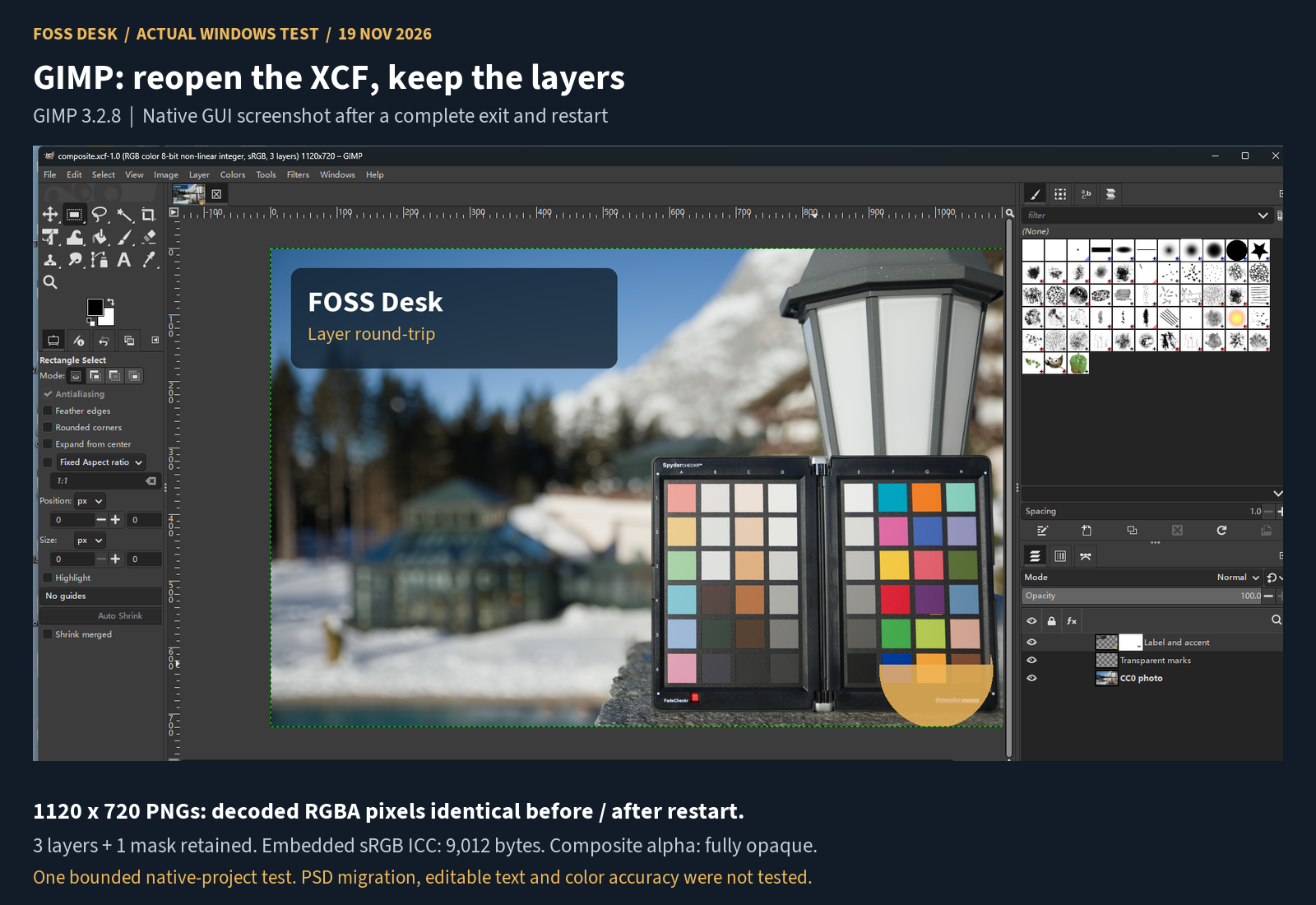
The label was rasterized before import. This was not an editable-text or font-migration test, and the XCF result says nothing about a Photoshop PSD round trip.
Krita: the reopened painting layer remained editable
Tested: Krita 5.3.4.1, Windows, 19 November 2026.
Using the same photo background, we created a Paint study group with a separate Mouse strokes painting layer. We drew three black marks with a mouse and set the layer to 65% opacity, then saved a KRA project and a PNG.
After completely quitting Krita and reopening the KRA, the group, painting layer and opacity setting were still present. We added a vertical mark on that original layer and saved the edited project and a second PNG.
The saved layer kept the same UUID; its painting data changed. Independent KRA checks found the expected group and layers, with opacity stored as 166 out of 255. The photo background's 247 stored tiles were unchanged after accounting for their serialization order. Each KRA's merged image matched its corresponding PNG export pixel for pixel.
The two PNGs were 1200×800. The added mark changed 9,697 pixels in its own small area. Both exports were fully opaque and contained an sRGB profile; neither output was a transparent-background painting example.
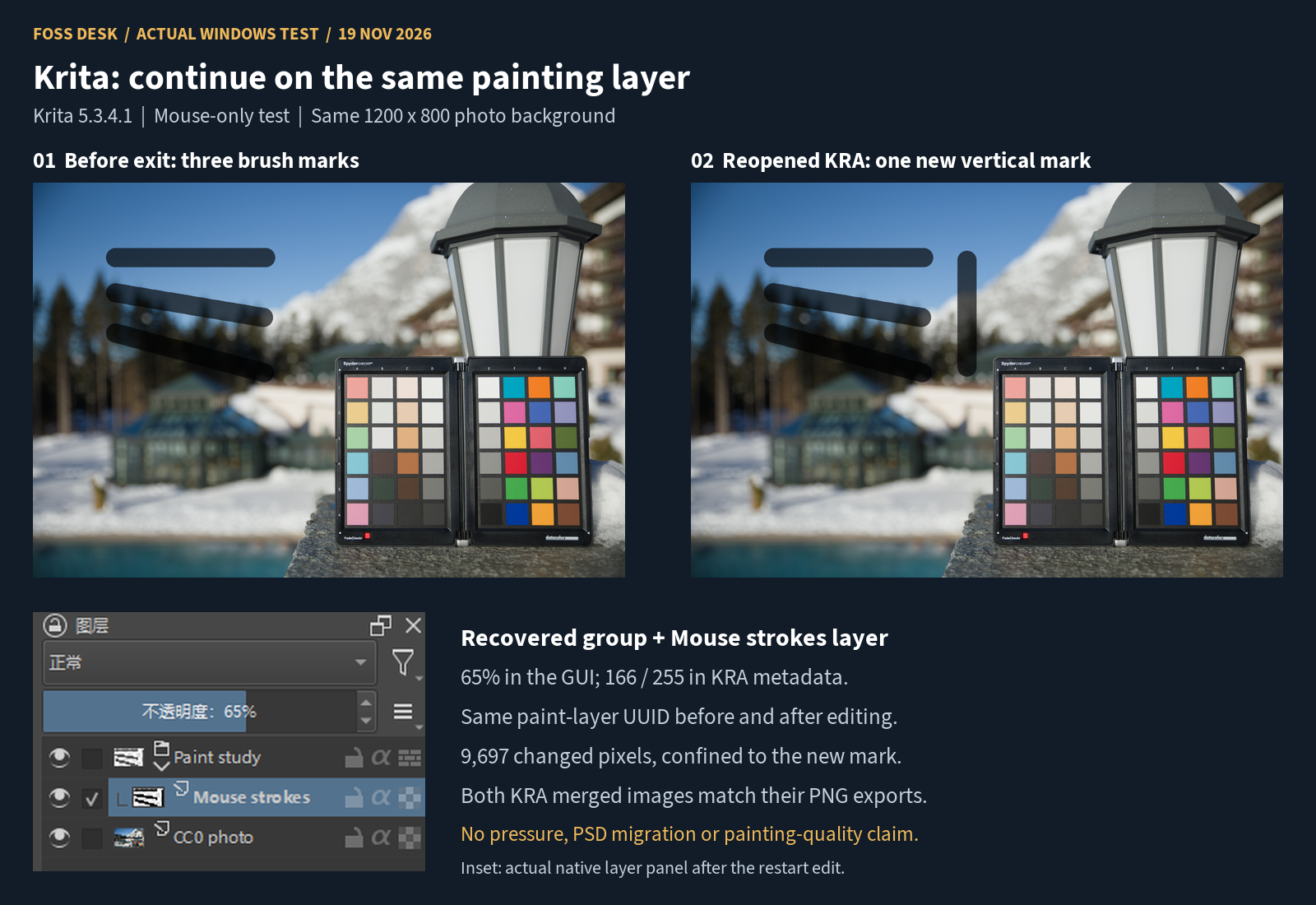
This was a layer-persistence and continued-editing check. We did not use a pressure-sensitive tablet or assess painting quality, pressure response or brush performance.
Keep a native project as well as an exported image
- Keep the original input and save a separate native project: XCF for the tested GIMP workflow, KRA for the tested Krita workflow.
- Name the layers you expect to edit later. Save before exporting a flattened preview.
- Quit the app and reopen the native project. Check the actual layers, mask or group, rather than relying on the PNG alone.
- Export for the intended use and inspect the result. Profile and alpha settings need checking; their presence alone does not prove color accuracy or visible transparency.
Method and limits
FOSS Desk ran these native GUI tasks with mouse-and-keyboard automation on one Windows machine. The base photo was a resized derivative of an existing darktable export from a CC0 raw.pixls.us sample. The GIMP overlay used self-made shapes and rasterized Source Sans 3 text under its OFL license. Sources and input hashes are retained with the test records.
We checked the saved files separately: XCF headers and layer/mask records, KRA ZIP integrity and XML layer records, stored background tiles, and decoded PNG pixels and profiles. The XCF parser did not independently decode XCF image tiles. This is a record of two small 8-bit sRGB projects, not a comprehensive editor benchmark.
We did not test Photoshop-native PSD import/export, smart objects, editable text, CMYK print delivery, HDR, third-party plugins, AI tools, large-document performance, tablet pressure, macOS or Linux. Before switching a work project, test a copy with the features, fonts and delivery format that project actually needs.
Questions about these alternatives
Which should I try first for a photo composite?
GIMP is the starting point supported by our photo-composite task: a photo, imported artwork, a mask and a crop. The test covers that small native workflow, not every kind of retouching.
Does the Krita test show that drawing can continue after reopening?
Yes, for this KRA. We added a new mark on the same named painting layer after restarting Krita, with its group and opacity setting retained.
Will my Photoshop PSD look and behave the same?
We have not verified that. These experiments used native XCF and KRA projects, so they provide no Photoshop PSD fidelity guarantee.
Why keep XCF or KRA if I already have a PNG?
The native projects retained the structures we checked. Our PNGs were composite images; they were used to inspect visible output, not to preserve editable layer structure.
For other Adobe categories and official software sources, return to Adobe alternatives.